Building a Living Map of My Coffee Farm
I grow coffee on a hillside in Sakleshpur. I wanted to know what is planted in every square metre of it, and when it was last looked after. So I built a map that does exactly that, and then it grew a sky, a sun, a moon and a little yellow car.
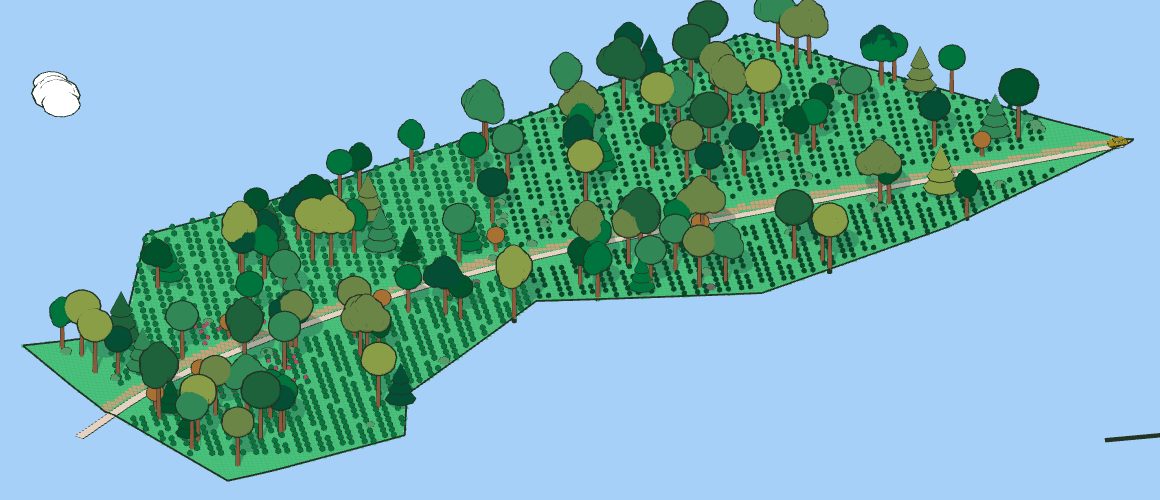
See it running live, right now.
Open the farm mapWhy I built it
A coffee farm is thousands of small, living things. Each coffee plant has a story: when it went in, whether it is Arabica or Robusta, when it was last pruned, whether it is healthy. The tall shade trees above them matter just as much. Fruit trees and flowers fill the gaps.
Right now most of that lives in memory and on paper. That works until it does not. A worker leaves, a notebook gets wet in the monsoon, or I simply forget which corner I replanted last June.
I spend my working days building systems that help companies stop relying on memory. A farm is also a system, just one that ignores your deadlines. So I wanted the same thing for the land: one place where every plant has an address and a history.
The idea: give every square metre an address
The farm is 3 acres and 31 guntas, a little over 15,000 square metres. I split it into a grid of one metre squares. That gives about 15,270 squares, and each one gets a simple address like R138C087: row 138, column 87, counting from the northern tip and the western edge.
Any square can hold a plant. Click a square on the map and a card opens with what grows there, when it was planted, its status, and the last time anyone touched it. The whole map is drawn from that list of plants. Change the list and the map changes with it.
What you are looking at
- The land. The outline comes from my own drawing, scaled so the area is right. The ground falls about 30 metres from the high western side to the low eastern side, the way the real hill does.
- The road. Traced from a satellite photo. It is a flat strip cut into the hillside, with a small earth bank on the uphill side.
- The plants. Coffee in rows down the slope, shade trees, fruit trees and flowers, each in its own square.
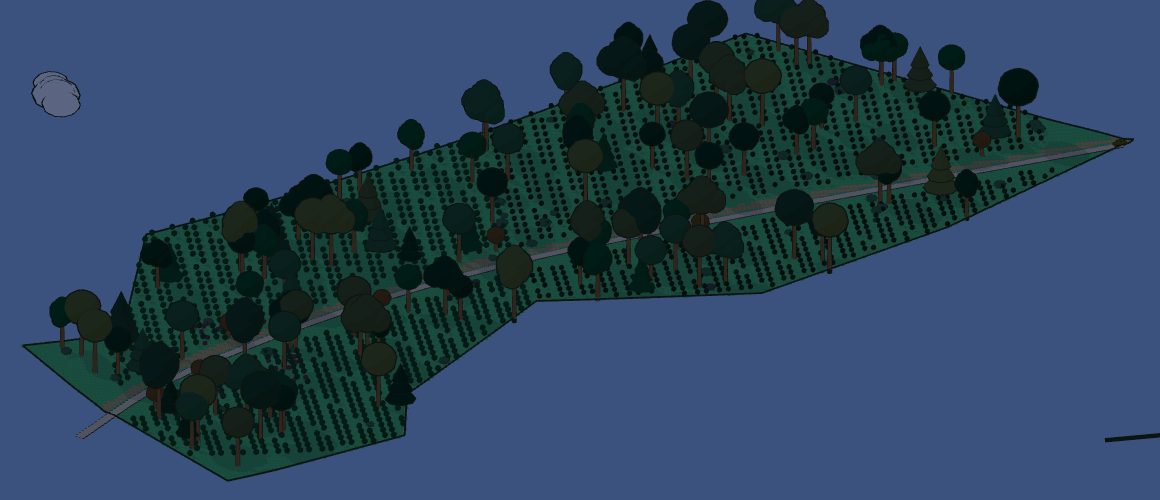
- The car. A yellow VW Taigun, built to its real size. It drives the road day and night. In the daytime it stops beside one square, R138C087, the boot opens, a couple pop out with camping chairs, sit for a few seconds and drive on.
It runs on the real day in Sakleshpur
The map is not a still picture. It follows the actual time and weather on the farm.
- The sun rises and sets at Sakleshpur's real times for that date, crosses the sky from east to west, and the shadows of the trees move with it.
- At night the map goes dark and is lit by moonlight. The brightness even follows the phase of the moon. The car turns its headlights on and lights up the road and trees ahead of it.
- The weather is real. Every ten minutes the page checks the current weather for Sakleshpur. If it is raining there, it rains on the map. Cloudy days show more clouds. Windy days send stronger gusts through the trees.
- The camera tours on its own. Leave it alone and it slowly circles the farm, follows the car, drops low between the trees, and sometimes looks straight down from above.
How it works, in plain words
The whole thing is one web page. It uses a free library called Three.js, which lets a browser draw 3D scenes. There is no app to install and no server doing heavy work.
Everything happens inside your browser. When you open the page, it reads two small files: one that describes the land and the road, and one that lists the plants. From those it builds the hill, places every tree and bush, and works out where the sun should be for the current time in India. The weather comes from a free public weather service. Even the background music is made up on the spot by the browser, so there is no recording to license.
That design was deliberate. I wanted something that keeps running on a screen for months without anyone looking after it. So it reloads itself once a night, slows itself down when nobody is touching it, and nudges its labels around slightly so a TV screen does not burn in. It costs nothing to run beyond the electricity of the screen.
I built it over a couple of days with Claude Code as my pair, describing what I wanted and checking every change in the browser before it went live. Most of the work was not code. It was deciding what the map should be.
What it is not, yet
To be honest about it: the plants you see today are placeholders. They show how the map will look and behave, but they are not my real plants yet. The outline is from my drawing, not a survey, and the slope is an estimate. The map is the frame. The farm still has to be filled in.
What it should become
This is where it gets useful.
- A real survey. A drone survey of the land will replace my drawing with the exact boundary, the true shape of the slope, and a photo from above that shows every tree.
- Every real plant. Walking the rows with a notebook, then turning those notes into the map, one square at a time. Arabica and Robusta marked separately. Shade trees by species.
- Logging from the field. Updating a plant from my phone while standing next to it: pruned today, looks weak, flowering, a photo. The map shows the latest for every square.
- Seeing patterns. Colour the map by health, by age, or by when a square was last visited. Spot the corner that keeps struggling, or the row nobody has checked in a month.
- Harvest and history. Over time, a record of which parts of the farm give the most and how that changes year to year.
The goal is simple. When I am away from the farm, I should still be able to look at it and know how it is doing, square by square. And when I am there, I should never have to rely on memory again.
Watch the farm, live in Sakleshpur time.
Open the farm mapSid Varma, October 2026. Questions or ideas: [email protected]